|
The Check Sum tool can be used to apply a number of Check Sum or Hash Algorithms to the current file. Run the Check Sum tool by clicking the 'Tools > Check Sum...' menu option or press Ctrl+K.
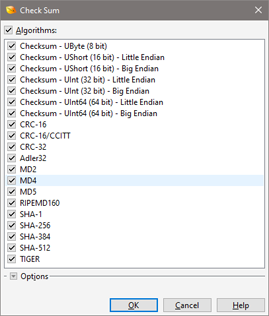
Select which Check Sum algorithms to perform on the file by checking or unchecking the algorithm name in the Algorithms list. Note that all algorithms can be selected or deselected at once by clicking the box beside the Algorithms label. The following algorithms are supported:
- Checksum - UByte (8 bit)
- Checksum - UShort (16 bit) - Little Endian
- Checksum - UShort (16 bit) - Big Endian
- Checksum - UInt (32 bit) - Little Endian
- Checksum - UInt (32 bit) - Big Endian
- Checksum - UInt64 (64 bit) - Little Endian
- Checksum - UInt64 (64 bit) - Big Endian
- CRC-16
- CRC-16/CCITT
- CRC-32
- Adler32
- MD2
- MD4
- MD5
- RIPEMD160
- SHA-1
- SHA-256
- SHA-384
- SHA-512
- TIGER
Most checksum algorithms treat the data file as a list of unsigned bytes and then sum the values of those bytes (this type of algorithm can be performed by selecting the Checkum - UByte algorithm). However, some checksum algorithms need to treat the data file as a list of unsigned shorts, ints, or int64s (see Using the Inspector for more information on different data types). These type of checksums can be calculated by selecting the Checksum - UShort, Checksum - UInt, or Checksum - UInt64 algorithms respectively. Note that there are two versions of these algorithms, one where the file is treated as Little Endian and one where the file is treated as Big Endian (see Introduction to Byte Ordering for more information on endianness). For unsigned short, int, or int64 checksum algorithms the data will be padded with zeros if the data size is not a multiple of the data type size. The details of the other algorithms are beyond the scope of this help file.

Some advanced options can be controlled by clicking the Options button. If no bytes are selected in the file when the Check Sum tool is run, the algorithms will be applied to all bytes in the file. When a selection is made, select the Selection toggle in the dialog box to apply the algorithms to only the selected bytes (the default), or the Entire File toggle to apply the algorithms to all bytes.
Besides limiting the checksum to the selected bytes, explicitly excluding certain byte ranges is possible by enabling the Ignore Byte Ranges toggle and entered ranges in the associated field. Multiple addresses can be indicated using commas, and a range of addresses can be indicated using '..' between two addresses (the range is inclusive). Any of the standard numeric formats can be used in the field. For example, entering the ranges '512..515,0x1000' would ignore the 4 bytes starting at position 512, and the single byte at 0x1000. This feature is useful to calculate the checksums for files where the actual checksum is stored in the file and thus should be excluded from the calculation.
The CRC-16, CRC-16/CCITT and CRC-32 algorithms can be customized by clicking the Options button and using the Custom Polynomials section. Enable the toggle beside the name of the algorithm to customize, and then enter the starting value for the CRC in the Initial Value field and the polynomial for the algorithm in the Polynomial field. Clicking the Reset button to the right of an algorithm resets all values for that algorithm to their default values. Note that different polynomials exist for some algorithms depending upon how the algorithm is implemented internally and this dialog lists the default polynomials for how 010 Editor has implemented the algorithms.
Click the OK button to perform the calculation or click the Cancel button to dismiss the dialog.
Output Window

The results of the different algorithms are displayed in the Output Window as a Table. The algorithm name is listed under the Algorithm column and the result is displayed in the Check Sum/Digest column. The result can be copied to the clipboard by right-clicking the Output Window and selecting 'Copy'.
By default, all checksums will be displayed as a 64-bit number in hex notation where the first 32 bits and the last 32 bits are separated by a space (for example, "00000000 00007F80"). The checksums can be configured to only display 32, 16, or 8 bits instead of 64 by right-clicking on the Checksum/Digest column and selecting the Checksum Precision menu option. Also, the results can be displayed in decimal notation by right-clicking on the Checksum/Digest column and selecting the Column Display Format menu option. Select 'Clear' from the right-click menu to clear all of the results. Press the Esc key in the Output Window to hide the window.
| 



